


Stop the ringing! If your phone feels more like a telemarketer hotline than a personal device, these 8 free tools will help you reclaim your peace and quiet.

8 FREE Tools to Block Spam Callers
I don’t know about you, but I get spam calls a LOT—several times a day, actually. I am on the “Do Not Call” list and I still get them.
If you have the same problem, there are several FREE tools to block and control these interruptions. Here is the best of the best for 2026. If you have any other favorites, please share them in the comments!
1) Google Call Screen — My Favorite!
I love using this one. Pixel phones have a Google Assistant built right in. You can have the Assistant answer your calls for you to see what the person (or robot) wants.
Callers are told they’re speaking to an automated assistant and can leave a message. It is incredibly effective at making telemarketers hang up immediately!
2) Mr. Number
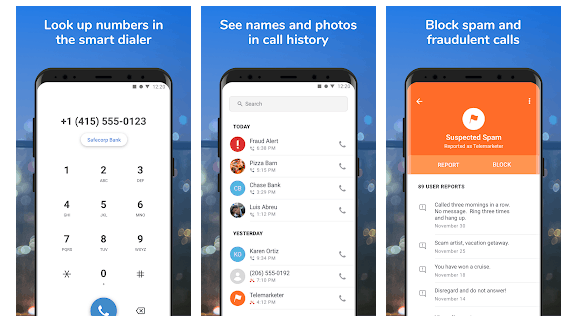
This is basically a massive database of spam numbers built by the community. Mr. Number allows you to block calls from specific people, businesses, and even entire hidden area codes.
You can also browse comments from other users when you get a suspicious call to see if it’s a known scam. Available on Android and iOS.
3) Verizon Call Filter
Call Filter is often pre-installed on Verizon phones, but you can also download it for Android and iOS. As calls come in, they’re matched against a database and you’ll see a risk rating.
The basic app is free, but they do offer a paid tier for $3/month if you want a personal block list.

4) T-Mobile Scam Shield
T-Mobile’s Scam Shield is the most advanced option they offer. It includes free scam ID and blocking.
If you want more control (like sending all political calls to voicemail), they have a premium version, but the basic “Scam Block” is free for all customers and stops “Scam Likely” calls before they even reach you.
5) AT&T ActiveArmor
If you’re on AT&T, you can install the ActiveArmor app (formerly Call Protect) for Android or iOS. It automatically blocks calls from “bad actors” and alerts you to suspected spam.
AT&T has also moved much of this blocking to the network level, so it works automatically for new accounts!

6) Hiya
Hiya is the engine that actually powers the spam protection for many phone manufacturers (like Samsung). It’s a clean, ad-free app that identifies the callers you want to talk to and blocks the ones you don’t.
It’s perfect if your carrier doesn’t have a great built-in tool.
7) Call Block (iOS)
Available for iOS, Callblock compares incoming calls with a database of over 3 million records. A great feature of this app is that you can specify the types of calls you’re happy to let through—like allowing charity fundraisers but blocking telemarketers.
8) Samsung Smart Call
Samsung phones come with a built-in feature named Smart Call. It identifies spam and lets you report numbers directly from the dialer. To turn it on, go to Call Settings > Caller ID and Spam Protection. Note: Some carriers disable this to push their own apps, so check your settings!
Hope you enjoyed this list of FREE tools to block spam callers! Don’t let the robots win—share this with your friends!